Computer Graphics Software Stack
Modern computer graphics involve a complex software stack that orchestrates multiple layers of abstraction, from the operating system’s windowing system to the final pixel output on the monitor. Understanding this stack is crucial for developers working with graphics applications, UI frameworks, or system-level programming.
- The Software Stack Overview
- Layer 1: Operating System - Windowing System
- Layer 2: Application Layer
- Layer 3: UI Framework Layer
- Layer 4: Graphics Library Layer
- Layer 5: Hardware Output
- Complete Workflow
- Window Creation and Initialization Flow
- Key Concepts and Responsibilities
- Performance Considerations
- Conclusion
The Software Stack Overview
The graphics rendering pipeline can be conceptualized as a layered architecture:
- Operating System Layer: Window management, input handling, and display output
- Application Layer: Content creation and event handling
- UI Framework Layer: High-level UI components and abstractions
- Graphics Library Layer: Low-level rendering operations
- Hardware Layer: GPU and display hardware
Let’s explore each layer in detail.
Layer 1: Operating System - Windowing System
The operating system provides the foundation for graphical applications through its windowing system (also called window manager). This system is responsible for:
Window Management
- Window Creation: When an application requests a window, the OS allocates system resources and creates a window object
- Window Positioning: The OS maintains the position and size of each window on the screen
- Window Stacking: Managing the z-order (which windows appear on top)
- Window Decorations: Title bars, borders, and controls are typically managed by the OS
Input Handling
- Mouse Cursor Management: The OS tracks the cursor position globally and determines which window the cursor is over
- Event Routing: When input events occur (mouse clicks, keyboard presses), the OS:
- Determines the target window based on cursor position
- Transforms global coordinates to window-relative coordinates
- Delivers the event to the UI framework associated with that window
Display Output
- Compositing: The OS composites all windows into a final framebuffer
- Display Driver Interface: Communicates with display hardware to output pixels to the monitor
Layer 2: Application Layer
Applications are responsible for:
Content Definition
- Defining what should be displayed in their windows
- Managing application state and logic
- Responding to user interactions
Event Handling
- Receiving input events from the UI framework (mouse clicks, keyboard input, window resize events)
- Processing these events and updating application state accordingly
- Requesting window redraws when content changes
Applications typically don’t interact directly with the OS. Instead, they communicate through UI frameworks, which handle OS interactions on their behalf.
Layer 3: UI Framework Layer
UI frameworks provide high-level abstractions for building user interfaces:
UI Components
- Widgets: Buttons, text boxes, menus, toolbars
- Layout Managers: Organizing components spatially
- 2D Graphics: Images, icons, vector graphics
- 3D Graphics: 3D models, scenes, cameras
Framework Responsibilities
- OS Interface: Communicating with the OS for window creation and event reception
- Component Rendering: Converting UI components into drawable primitives
- Event Handling: Receiving OS events, translating them into framework-specific events, and delivering them to applications
- State Management: Managing component state (hover, focus, etc.)
- Styling: Applying themes, colors, fonts
Popular examples include Qt, GTK, WPF, Cocoa, and web frameworks like React/Vue.
Web Browsers as a Special UI Framework
Web browsers represent a unique and important category of UI frameworks. They function as a complete UI framework stack with distinctive characteristics:
Declarative Markup Language
- HTML (HyperText Markup Language): A declarative language for defining UI structure and components. Instead of imperatively creating UI objects through API calls, developers describe the desired UI structure using markup tags.
- CSS (Cascading Style Sheets): A declarative styling language that separates presentation from structure. CSS defines how HTML elements should be visually rendered.
Browser Architecture
A web browser contains multiple integrated subsystems that together form a complete UI framework:
- HTML/CSS Parser: Interprets declarative markup and stylesheets
- Layout Engine (also called Rendering Engine):
- Converts HTML/CSS into a render tree
- Calculates layout and positioning (flow, flexbox, grid, etc.)
- Examples: Blink (Chrome), Gecko (Firefox), WebKit (Safari)
- Graphics Rendering: Uses graphics libraries (often Skia, Cairo) to render the layout
- JavaScript Engine: Provides interactivity and dynamic behavior (V8, SpiderMonkey, JavaScriptCore)
- Event System: Handles DOM events, user interactions, and browser events
Unique Characteristics
Declarative vs Imperative: Unlike traditional UI frameworks where you imperatively create and configure components through code (e.g., button = new Button(); button.setText("Click");), web uses declarative markup (<button>Click</button>) that the browser interprets and renders.
Separation of Concerns: HTML defines structure, CSS defines presentation, and JavaScript defines behavior. This separation is more explicit than in many traditional frameworks.
Sandboxed Environment: Web applications run in a sandboxed environment with security restrictions, unlike native applications that have direct OS access.
Cross-Platform: The same HTML/CSS/JavaScript code can run on different operating systems, with the browser handling OS-specific differences.
The Rendering Pipeline in Browsers
When a web page loads:
- Browser receives HTML/CSS/JavaScript from the web server
- Parser builds the Document Object Model (DOM) and CSS Object Model (CSSOM)
- Layout Engine combines DOM and CSSOM into a render tree
- Layout Engine calculates layout (positions, sizes)
- Graphics Library (within browser) paints the pixels
- Browser presents the rendered content in its window (which the OS manages)
The browser itself is the application that uses the OS windowing system, but internally it functions as a UI framework that interprets HTML/CSS and renders components. Modern web frameworks like React, Vue, or Angular are application frameworks that run on top of the browser’s UI framework, providing higher-level abstractions for building complex web applications.
Layer 4: Graphics Library Layer
Graphics libraries perform the actual rendering work:
Rendering Operations
- 2D Rendering: Drawing lines, shapes, text, images
- 3D Rendering: Transforming 3D models, applying lighting, rasterization
- GPU Programming: Utilizing shaders, compute shaders for parallel processing
GPU Utilization
When complex rendering is needed (3D graphics, video playback, image processing), graphics libraries:
- Submit Commands: Send rendering commands to the GPU
- Resource Management: Manage textures, buffers, shaders on the GPU
- Synchronization: Coordinate between CPU and GPU execution
Examples include OpenGL, Vulkan, DirectX, Metal, and software renderers like Cairo, Skia.
Layer 5: Hardware Output
Finally, the OS takes the rendered content and:
- Composites: Combines all windows into a final image
- Display Output: Sends the final framebuffer to the display hardware
- Refresh: Updates the monitor at its refresh rate (typically 60Hz, 120Hz, or higher)
Complete Workflow
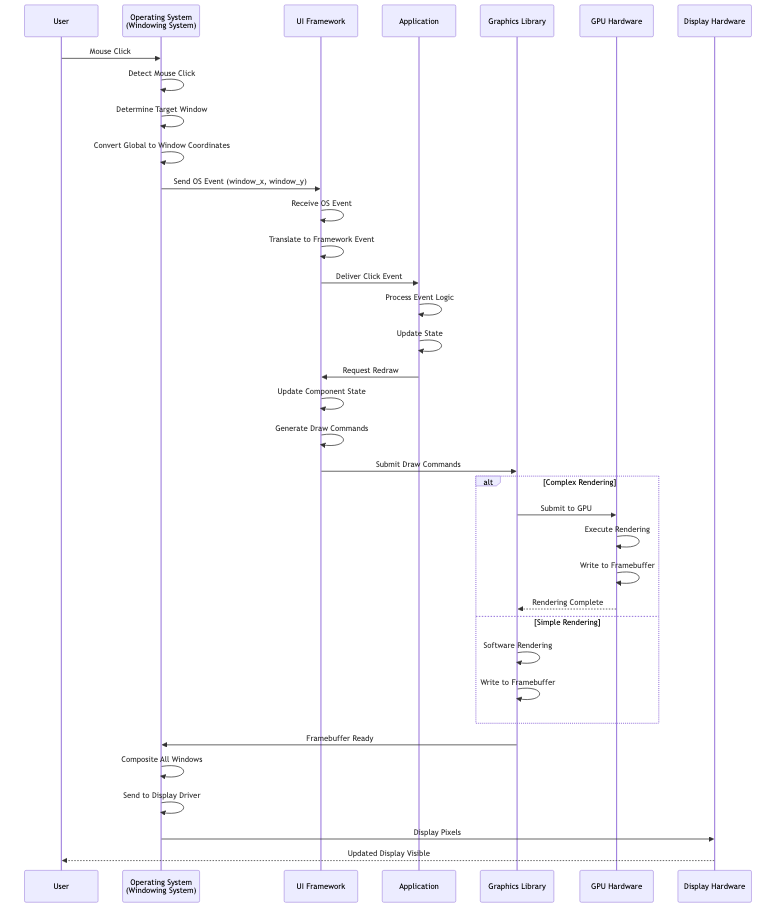
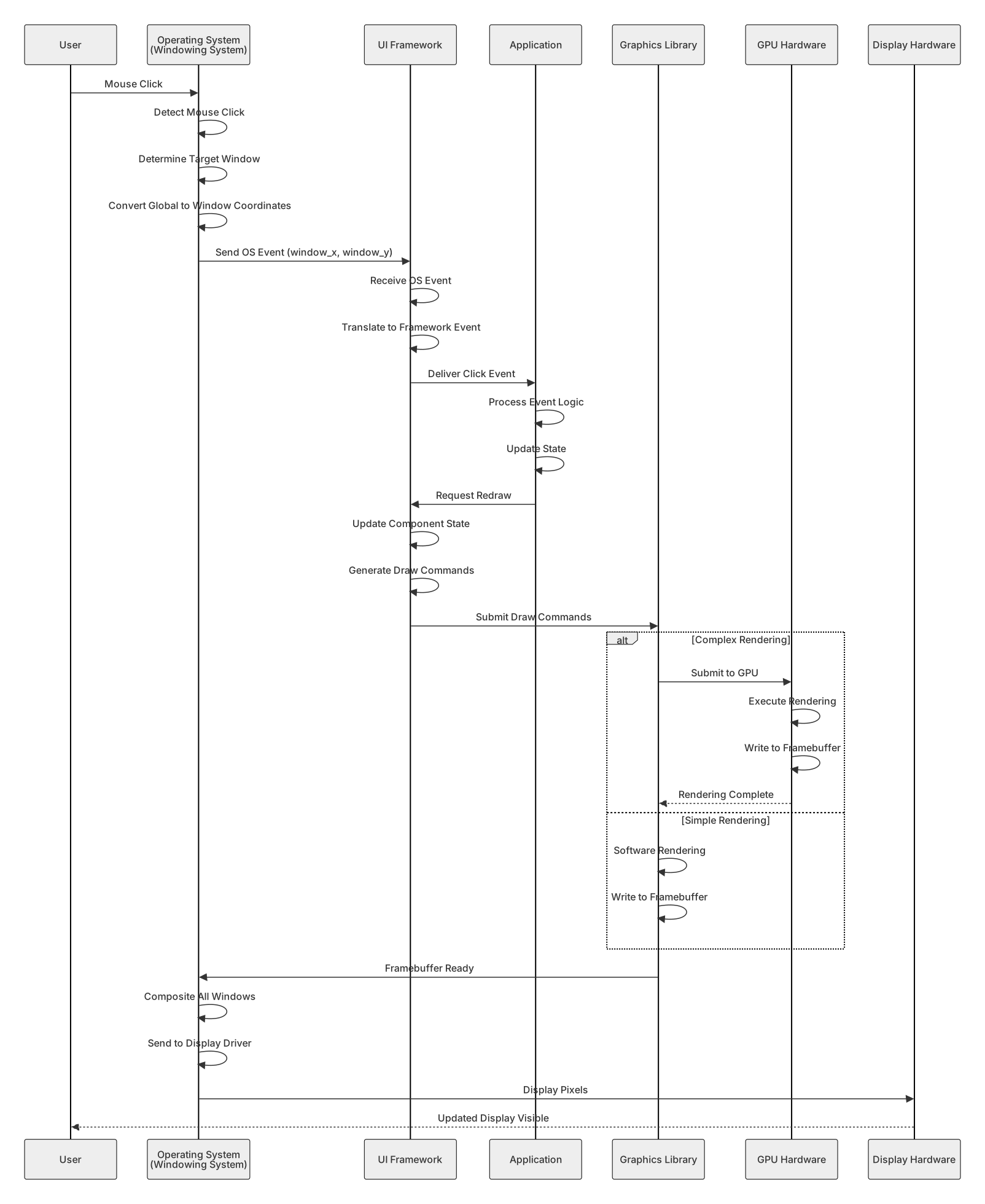
The following sequence diagram illustrates the complete workflow from user interaction to display:
Window Creation and Initialization Flow
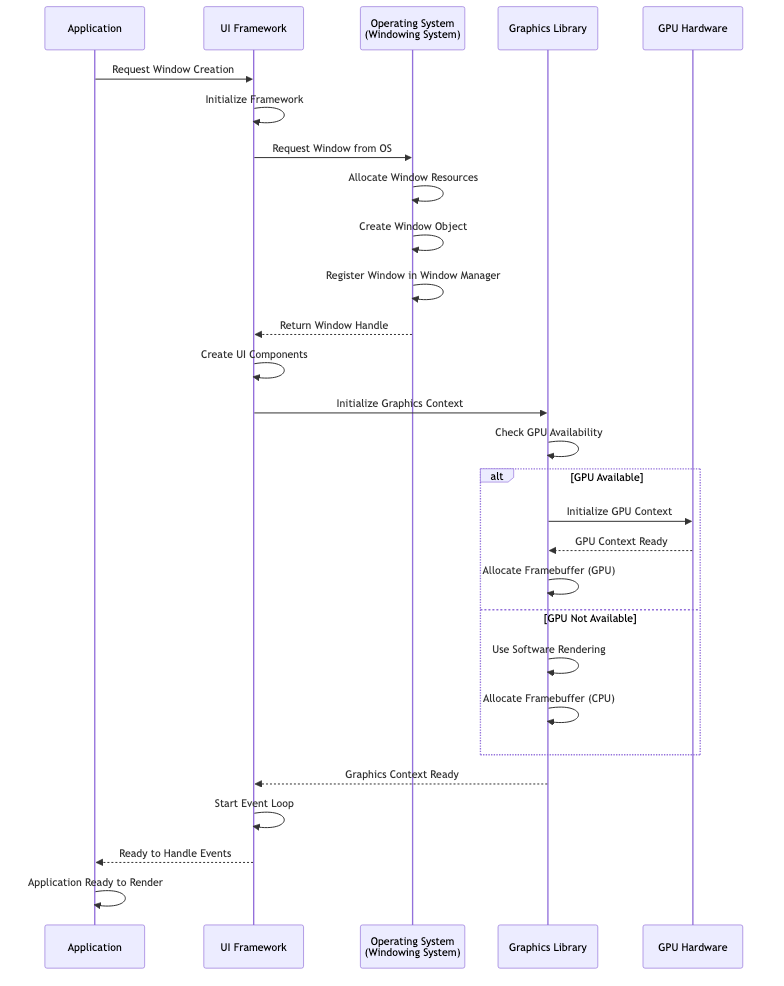
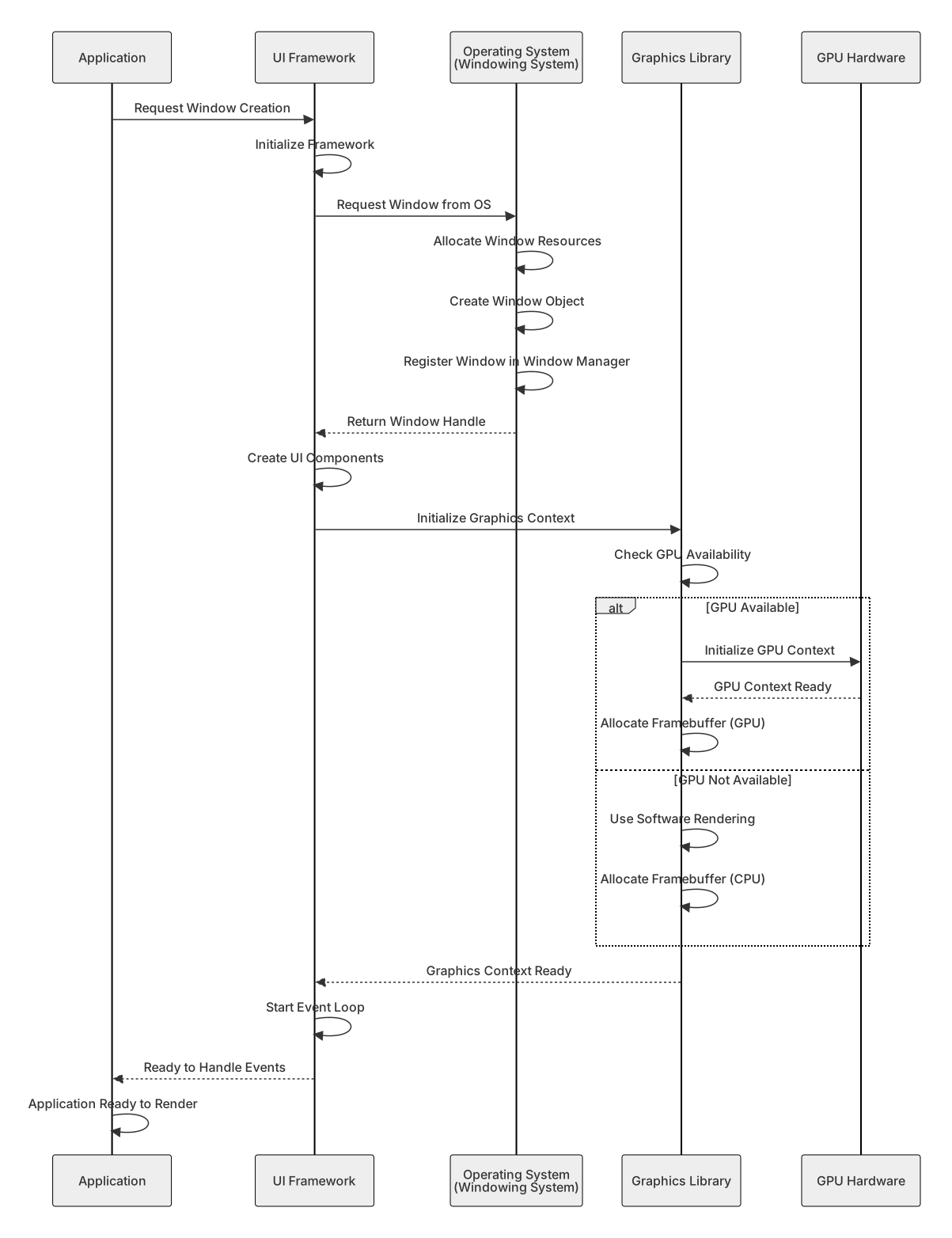
The process of creating a window and setting up the rendering pipeline:
Key Concepts and Responsibilities
Operating System Responsibilities
- Window Lifecycle: Creation, destruction, resizing, moving
- Input Event Routing: Delivering mouse/keyboard events to correct windows
- Coordinate Transformation: Converting between global screen coordinates and window-relative coordinates
- Compositing: Combining multiple windows into a single display output
- Display Management: Communicating with display hardware
Application Responsibilities
- Business Logic: Implementing application-specific functionality
- State Management: Maintaining application state
- Event Processing: Handling user input and system events
- Content Definition: Specifying what to display
UI Framework Responsibilities
- Component Abstraction: Providing reusable UI building blocks
- Layout Management: Arranging components spatially
- Event System: Translating OS events to framework events
- Styling: Applying visual appearance to components
Graphics Library Responsibilities
- Rendering Primitives: Drawing basic shapes, text, images
- GPU Management: Managing GPU resources and execution
- Optimization: Batching, culling, and other performance optimizations
- API Abstraction: Providing a consistent interface regardless of underlying hardware
Performance Considerations
The graphics stack involves several performance-critical areas:
- Event Latency: Time from user input to visual feedback
- Rendering Performance: Frames per second (FPS) for smooth animation
- GPU Utilization: Efficient use of parallel processing capabilities
- Memory Bandwidth: Transferring data between CPU and GPU
- Compositing Overhead: Cost of combining multiple windows
Modern systems use various techniques to optimize these:
- Double/Triple Buffering: Reducing visual artifacts
- VSync: Synchronizing with display refresh rate
- GPU Command Batching: Reducing CPU-GPU communication overhead
- Hardware Acceleration: Offloading work to specialized hardware
Conclusion
The computer graphics software stack is a sophisticated multi-layer system that coordinates between the operating system, applications, UI frameworks, graphics libraries, and hardware. Each layer has distinct responsibilities, and understanding how they interact is essential for:
- Application Developers: Knowing when and how to request redraws, handle events
- UI Framework Developers: Understanding rendering requirements and optimization opportunities
- Graphics Programmers: Knowing how to efficiently utilize GPU resources
- System Programmers: Understanding windowing system internals and display management
The abstraction layers allow developers to work at their appropriate level of detail while the system handles the complex coordination between software and hardware components.