VMware Fusion Networking on macOS
- Layer 2 switch basics
- Lab setup
- Naming systems
- Overview: three attachment paths
- Mode 1: Private to my Mac
- Mode 2: Share with my Mac
- Mode 3: Autodetect / Bridged
- Mode comparison
- References
VMware Fusion presents an ordinary Ethernet adapter to a guest, but the host side is built from macOS virtual interfaces, software bridges, DHCP services, and—depending on the selected mode—a NAT gateway or a physical-network attachment. The confusing part is that names such as vmenet3, bridge101, and vmnet8 look similar while describing different layers of the implementation.

The guest talks to VMware Fusion over a virtual Ethernet NIC. Fusion runs on the Mac and plugs that attachment into the host’s networking stack. The rest of this post is about how that plug is wired in each mode.
Fusion offers three built-in attachments. They are the backbone of this post:
| Fusion setting | What it is | Guest IP in this lab |
|---|---|---|
| Private to my Mac | Host-only private LAN | 172.16.130.128 |
| Share with my Mac | Private LAN + NAT | 192.168.10.129 |
| Autodetect / Bridged | Layer 2 attachment to the physical NIC | 192.168.3.20 |
The short conclusion is:
- Private to my Mac is a private Layer 2 network shared only with the Mac.
- Share with my Mac is that same kind of private Layer 2 network plus a Layer 3 NAT service.
- Autodetect / Bridged connects the VM to the physical LAN at Layer 2. On wired Ethernet that can be transparent; on ordinary Wi-Fi, macOS uses MACNAT, so the guest keeps its own IP while frames on the air use the Mac’s Wi-Fi MAC.
Before the lab captures, the next section reviews how a Layer 2 switch works and why every macOS interface in ifconfig shows a MAC address—including virtual switch ports. That vocabulary makes the three Fusion topologies much easier to read.
Layer 2 switch basics
Fusion’s host-only, NAT, and bridged paths are all built from the same pieces: Ethernet-like ports, a software bridge (switch), and—only in some modes—a Layer 3 NAT router. The guest itself always looks like a machine with one NIC. The interesting topology is on the Mac.
Frames, not packets
At Layer 2, nodes exchange Ethernet frames. A typical frame carries:
- destination MAC
- source MAC
- ethertype / length
- payload (often an IP packet)
- FCS (CRC)
IP addresses are inside the payload. A pure Layer 2 switch forwards using MAC addresses; it does not need to understand IP.
MAC address versus MAC hardware
Two different “MAC” meanings appear throughout this post:
| Term | What it is |
|---|---|
| MAC address | The 48-bit identity in the Ethernet header (e.g. 00:0c:29:a5:02:c4) |
| MAC hardware | The engine on a port that sends and receives Ethernet frames (framing, FCS, TX/RX) |
[ higher layers / switch fabric ]
              │
         MAC hardware     ← turns bytes into frames and back
              │
            PHY           ← electrical / optical / radio signaling
              │
           the medium
Each physical switch port normally has its own RX/TX path (MAC hardware + PHY). Several ports can receive frames at the same time. A shared fabric in the middle looks up the destination MAC and queues the frame for the egress port(s).
Per-port receive/send capability does not mean each port owns a unique station MAC address for forwarded frames.
How a transparent Layer 2 switch forwards
A normal Ethernet switch is a transparent bridge:
- A frame arrives on a port.
- The switch learns “source MAC → this ingress port.”
- It looks up the destination MAC:
- known → forward only to that port
- unknown / broadcast / multicast → flood to other ports
- The frame leaves with the same Ethernet source and destination. The switch does not rewrite the source to “port 3’s MAC.”
So for data-plane forwarding:
- each port can receive and send independently
- the switch usually does not put a unique per-port station MAC into every transit frame
- the chassis may still have one or a few system/management MACs (STP, management CPU, some control protocols)
Mental model:
Host A ── port1 ┐
                ├── switch fabric (learn / forward / flood) ── port3 ── Host C
Host B ── port2 ┘
Hosts A/B/C each have a station MAC. Ports 1/2/3 are mainly relays.
Endpoint versus switch port
Both an endpoint (host NIC) and a switch port have hardware or software that can send and receive Ethernet frames. Physically they look similar. Logically they are different.
Working distinction for this post:
| Role | Logical job | MAC addresses in the frames it handles |
|---|---|---|
| Endpoint (NIC) | Originate and terminate traffic for one station | Normally one station MAC: TX source = its MAC; RX cares about frames to its MAC (+ broadcast / multicast) |
| Switch port | Relay frames for a bridge/switch | Many MACs: TX/RX transit frames whose source/dest are other stations’ addresses; the port is not those stations |
Endpoint:     stack ── own MAC only ── medium
Switch port:  bridge fabric ── many MACs in/out ── medium
So: same send/receive machinery, different contract.
- If the attachment is fixed to a single station identity, treat it as an endpoint.
- If it regularly carries frames for multiple station MACs as a relay, treat it as a switch port (bridge member / uplink).
Two important refinements so this does not become a false absolute:
- Forwarding defines the switch. Multi-MAC I/O is what a port needs in order to relay. The switch is the fabric (
bridgeNor a hardware ASIC) that learns and forwards between members. An interface in promiscuous mode can hear many MACs without being a switch by itself. - One interface can be both. On macOS bridged networking,
en0stays an endpoint for the Mac’s own IP and acts as a switch-member uplink for guest frames (wired: real multi-MAC; Wi-Fi: MACNAT so on-air TX still uses the Wi-Fi station MAC).
| Object | Role | Station MAC in the header? |
|---|---|---|
| Host NIC (endpoint) | Originate / terminate | Yes — its own MAC when the host talks |
| Switch data port | Relay between segments | Transit frames keep the stations’ MACs; the port is not their Ethernet identity |
Why every macOS interface still shows a MAC
On a Mac, ifconfig lists many interfaces—en0, bridge100, vmenet0, vmenet3—and each one shows an ether address. That looks as if every switch port has a station MAC. The reason is how BSD/macOS models networking, not how a transparent hardware switch labels copper ports.
macOS represents almost everything that can carry Ethernet frames as a network interface. An interface object in the kernel traditionally has:
- an interface name (
en0,bridge100,vmenet3) - link-layer machinery
- a default link-layer address field
So when Fusion and Apple’s vmnet stack create a software switch, you see:
| Interface | What it is in Fusion | Endpoint or switch port? |
|---|---|---|
en0 |
Real Wi-Fi / Ethernet NIC | Endpoint for the Mac on the physical LAN (and, in bridged mode, also an uplink member of the bridge) |
vmenetN |
Virtual member attached to a bridgeN |
Primarily a switch port (relay for guest frames). It looks like a full NIC in ifconfig, so it could be used as an endpoint, but Fusion does not put the Mac’s IP on vmenetN |
bridgeN |
Software switch in the macOS kernel | The switch itself (learning / forward / flood among members). When it also has an IP (e.g. 172.16.130.1), that is the Mac’s host attachment to this L2 segment—like an SVI / CPU port on a hardware switch—not an uplink |
The switching is entirely software inside macOS (if_bridge). There is no separate physical switch chip for bridge100 / bridge101. Member ports (vmenet*, and sometimes en0) are the ports; bridgeN is the virtual fabric that connects them.
When people say “bridge100 is 172.16.130.1,” they mean the Mac plugged its IP stack into that fabric so the host can talk on the same L2 network as the guests. Analogy:
Hardware switch:   [ port1 | port2 | port3 | SVI/VLAN IF with IP ]
Software bridgeN:  [ vmenet… members = ports | bridgeN with IP = SVI ]
An uplink is a different idea: a member that leads toward another network (in bridged mode, that member is often en0). bridgeN is not the uplink; it is the switch (and optionally the Mac-on-this-LAN endpoint).
Do not equate “bridgeN has an IP” with “bridgeN is a gateway”:
| Mode | bridgeN IP? |
What that means | Gateway? |
|---|---|---|---|
| Autodetect / Bridged | Usually no (this lab: bridge102 had only a MAC) |
Switch among vmenet and en0; Mac stays endpoint on en0; en0 is the uplink to the physical LAN |
Guest’s gateway is the LAN router, not the bridge |
| Private to my Mac | Yes (e.g. 172.16.130.1 on bridge100) |
Mac is a host/endpoint on the private L2 segment | No useful internet gateway by default — .1 is “reach the Mac,” not “reach the world” |
| Share with my Mac | Yes (e.g. 192.168.10.1 on bridge101) |
Mac is a host on the private L2 segment and runs NAT/routing off that network | Yes — the L3 NAT/routing service (often reached as .1 or another Fusion gateway address) is the guest’s path off the private LAN |
So: IP on bridgeN ⇒ Mac plugged into that switch. Gateway ⇒ separate L3 routing/NAT, present in Share mode, absent in Private, and unnecessary on the bridge in Bridged mode.
The confusing case is vmenetN. Answer in one line:
- In the topology: it is a port of the software switch (
bridgeNmember). Guest frames enter/leave the bridge through it. - In the OS API: it is still a network interface with its own MAC, because that is how macOS exposes any Ethernet-like attachment.
- In Fusion practice: the Mac does not talk to the guest “as
vmenet.” For Private / Share modes the Mac endpoint is thebridgeNIP. Guest transit frames keep the guest MAC; they do not need to use thevmenetifconfigMAC as Ethernet source.
guest frames:   guest MAC ──relay via──► vmenet ──► bridge ──► …
Mac host IP:    uses bridgeN (or en0), not vmenetN
Example from a bridged path:
Guest NIC:        00:0c:29:a5:02:c4   ← source MAC inside guest frames
vmenet3:          12:d9:f3:4f:cb:fe   ← ifconfig MAC of the virtual port (rarely the frame source)
bridge interface: be:d0:74:65:b4:66   ← ifconfig MAC of the bridge object
A frame from the guest can cross vmenet3 still sourced from 00:0c:29:a5:02:c4. The bridge learns that guest MAC on the vmenet3 member. The vmenet3 interface MAC is not automatically substituted into transit frames.
When the Mac talks on a private Fusion network as 192.168.10.1 or 172.16.130.1, it uses the bridge interface as the endpoint, so the bridge MAC participates in ARP and Ethernet delivery. Even a bridge without an IPv4 address remains an Ethernet-like BSD interface and is assigned an address. Apple’s XNU bridge implementation creates a default bridge MAC and can derive it from a member.
Short rule for the rest of this post:
vmenetN≈ switch member port (relay); ignore itsifconfigMAC for guest trafficbridgeN/en0≈ where the Mac itself is an endpoint when it has an IP there- MAC inside a guest frame = guest NIC (unless MACNAT rewrites it later)
Member flags on macOS bridges
Bridge member flags in ifconfig describe learning and forwarding behavior:
LEARNING— learn source-MAC-to-port mappingsDISCOVER— flood unknown destinations through that memberPROMISC— receive frames beyond those addressed to this interface’s own MAC (needed for a relay port)MACNAT— rewrite MACs at this member (important for Wi-Fi bridged mode later)
PROMISC is mainly a receive behavior. It is not what “gives permission” to transmit an arbitrary source MAC.
Lab setup
The same guest virtual NIC was used in all three tests:
enp2s0
MAC address: 00:0c:29:a5:02:c4
Changing the Fusion network mode changes what this NIC is attached to; it does not replace the virtual NIC or its MAC address.
The Mac’s physical Wi-Fi interface stayed:
en0: inet 192.168.3.4 ether ca:94:35:af:4e:77
| Fusion mode | Guest IPv4 | Mac external IPv4 | Guest subnet relative to Mac |
|---|---|---|---|
| Private to my Mac / host-only | 172.16.130.128/24 |
192.168.3.4/24 |
Separate private LAN, no external route |
| Share with my Mac / NAT | 192.168.10.129/24 |
192.168.3.4/24 |
Separate private LAN |
| Bridged / Autodetect | 192.168.3.20/24 |
192.168.3.4/24 |
Same physical LAN |
Fusion’s local configuration confirms the two private subnets:
answer VNET_1_DHCP yes
answer VNET_1_HOSTONLY_SUBNET 172.16.130.0
answer VNET_1_HOSTONLY_NETMASK 255.255.255.0
answer VNET_1_VIRTUAL_ADAPTER yes

answer VNET_8_DHCP yes
answer VNET_8_HOSTONLY_SUBNET 192.168.10.0
answer VNET_8_HOSTONLY_NETMASK 255.255.255.0
answer VNET_8_NAT yes
answer VNET_8_VIRTUAL_ADAPTER yes
This matches VMware’s documented roles: vmnet1 is normally host-only and vmnet8 is normally NAT. See Broadcom’s Understanding networking types in VMware Fusion.
Built-in virtual networks are persistent host objects. After changing modes, old bridges, vmenet* members, and ARP entries can remain until they age out. Use the guest subnet plus the relevant bridge’s neighbor state to identify the current path—not merely the presence of a vmenetN name.
Naming systems
Similar names hide different objects:
| Name | Where it exists | Meaning |
|---|---|---|
enp2s0 |
Linux guest | The Ethernet NIC visible to the guest OS |
en0 |
macOS host | The physical Wi-Fi interface in this lab |
vmenetN |
macOS host | A virtual Ethernet port used by macOS VM networking |
bridgeN |
macOS host | A software Layer 2 bridge/switch containing member ports |
vmnet1, vmnet8 |
VMware configuration | Logical VMware networks: host-only and NAT |
In particular, vmenet1 is not the same thing as VMware’s vmnet1. The NAT bridge can contain vmenet1, vmenet2, and vmenet3 even though its VMware logical network is vmnet8. The numeric suffixes belong to separate namespaces.
Apple’s vmnet framework lets VM software exchange complete Ethernet frames and supports host, shared, and bridged operating modes. A vmenetN interface is the host-side member port through which those frames enter a macOS bridge; treat it as a switch port in the topology, even though ifconfig presents it like a NIC.
Overview: three attachment paths
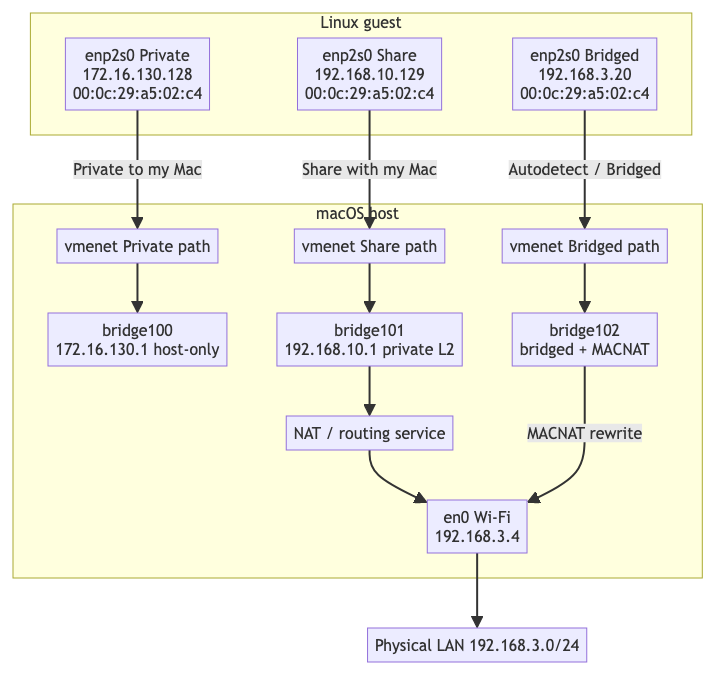
The diagram below shows one guest NIC in three configurations. The guest MAC stays 00:0c:29:a5:02:c4; only the DHCP lease and host-side attachment change. In live captures the host attachment often reuses a name such as vmenet3 when switching modes; the diagram keeps Private / NAT / Bridged paths separate so each mode is unambiguous.
Mode 1: Private to my Mac
Private to my Mac is Fusion’s host-only network (vmnet1). The guest is on a private Layer 2 segment with the Mac. There is no en0 member and no default path to the physical LAN.
Observation
After selecting Private to my Mac, the guest received:
enp2s0: flags=4163<UP,BROADCAST,RUNNING,MULTICAST> mtu 1500
    inet 172.16.130.128 netmask 255.255.255.0 broadcast 172.16.130.255
    ether 00:0c:29:a5:02:c4
macOS represented the host-only network as bridge100:
bridge100: flags=8a63<UP,BROADCAST,SMART,RUNNING,ALLMULTI,SIMPLEX,MULTICAST> mtu 1500
    ether be:d0:74:65:b4:64
    inet 172.16.130.1 netmask 0xffffff00 broadcast 172.16.130.255
    member: vmenet0 flags=3<LEARNING,DISCOVER>
    status: active
After the Mac contacted the guest, ARP/neighbor state showed:
? (172.16.130.128) at 0:c:29:a5:2:c4 on bridge100 ifscope [bridge]
That proves the guest’s host-only traffic is on bridge100. Important distinction: vmenet0 has its own interface MAC in ifconfig, but frames the guest sends still use the guest source MAC 00:0c:29:a5:02:c4. The bridge learns that guest MAC on the vmenet0 member port; it does not require the Ethernet source to equal vmenet0’s own interface MAC.
Topology
macOS host: 172.16.130.1
            |
        bridge100
            |
     vmenet  (Private path member)
            |
 guest 172.16.130.128 / 00:0c:29:a5:02:c4
What the host is doing
The Mac is an ordinary endpoint on this private bridge (172.16.130.1). Fusion’s DHCP serves addresses on 172.16.130.0/24. The network supports host-to-guest and same-host guest-to-guest communication. It stays present as a host object even when this VM is attached to NAT or bridged instead.
Mode 2: Share with my Mac
Share with my Mac is Fusion’s NAT network (vmnet8). Broadcom describes it as a separate private network on the Mac: the guest gets an address from the VMware virtual DHCP server and does not have its own IP on the external network.
Observation
Guest:
enp2s0:
    inet 192.168.10.129 netmask 255.255.255.0
    ether 00:0c:29:a5:02:c4
Host NAT-side bridge during the NAT test:
bridge101: flags=8a63<UP,BROADCAST,SMART,RUNNING,ALLMULTI,SIMPLEX,MULTICAST> mtu 1500
    ether be:d0:74:65:b4:65
    inet 192.168.10.1 netmask 0xffffff00 broadcast 192.168.10.255
    member: vmenet1 flags=3<LEARNING,DISCOVER>
    member: vmenet2 flags=3<LEARNING,DISCOVER>
    member: vmenet3 flags=3<LEARNING,DISCOVER>
    status: active

vmenet3: flags=8963<UP,BROADCAST,SMART,RUNNING,PROMISC,SIMPLEX,MULTICAST> mtu 1500
    ether 12:d9:f3:4f:cb:fe
    status: active
The physical Wi-Fi interface remained unchanged:
en0: inet 192.168.3.4 ether ca:94:35:af:4e:77
bridge100 / 172.16.130.1 was still present independently. It is the host-only network from Mode 1, not part of this VM’s NAT data path.
Topology
Linux guest
192.168.10.129 / 00:0c:29:a5:02:c4
        |
   virtual NIC
        |
     vmenet  (Share path member)
        |
 bridge101 -- macOS host endpoint 192.168.10.1
        |
 VMware/macOS routing, DHCP and NAT services
        |
      en0
192.168.3.4 / ca:94:35:af:4e:77
        |
 physical 192.168.3.0/24 LAN
What the host is doing
There are two distinct functions:
bridge101provides the private Layer 2 Ethernet segment.- A host networking service routes between that private segment and outside networks and performs IP/transport NAT.
The Mac therefore acts as a private Layer 2 switch plus a Layer 3 NAT router. The VM has no 192.168.3.x identity on the external LAN. Outbound connections normally appear to originate from the Mac’s 192.168.3.4 address; unsolicited inbound connections need an explicit port-forwarding rule.
In Share mode, the guest’s default gateway is the Mac on this private LAN. In practice that is usually the address shown on bridge101 (here 192.168.10.1), or occasionally another Fusion address on the same subnet—confirm with ip route in the guest.
Layering still matters for the mental model:
bridge101as an L2 switch forwards frames amongvmenetmembers.- The gateway job is L3: the Mac’s IP stack and NAT service, reached via that private-side address, route and translate packets out through
en0.
So it is fair to say “in Share mode the Mac/bridge101 side is the guest’s gateway.” It is not fair to say the L2 switching fabric itself performs NAT—the NAT/routing service does.
Apple similarly describes its NAT network attachment as routing guest requests through the host and translating the resulting packets.
Mode 3: Autodetect / Bridged
Autodetect is still bridged mode (vmnet0). It chooses an appropriate physical host interface. Broadcom describes a bridged guest as an additional computer on the same physical Ethernet network as the Mac.
Observation
Guest:
enp2s0:
    inet 192.168.3.20 netmask 255.255.255.0
    ether 00:0c:29:a5:02:c4
Host:
bridge102:
    member: vmenet3 flags=3<LEARNING,DISCOVER>
    member: en0 flags=8003<LEARNING,DISCOVER,MACNAT>
bridge102 had no IPv4 address. The Mac’s host IP stayed on en0 as 192.168.3.4.
Topology
Linux guest
192.168.3.20 / 00:0c:29:a5:02:c4
        |
 vmenet  (Bridged path member)
        |
    bridge102
        |
 en0, with MACNAT
        |
 Wi-Fi AP and physical 192.168.3.0/24 LAN
The guest uses the physical LAN’s DHCP server and default gateway and appears as another IP host on 192.168.3.0/24. Calling this a Layer 2 bridge is correct, but the MACNAT flag means it is not a completely transparent bridge at the MAC layer on Wi-Fi.
en0 as uplink and as the Mac’s own NIC
For the guest path, en0 is the bridge’s attachment to the physical LAN—the role people call an uplink:
guest → vmenet → bridge102 → en0 → physical LAN
The Mac does not get a separate host-only member port on bridge102 for its own IP. Contrast with Private and NAT, where the Mac is an endpoint on the private bridge (172.16.130.1 / 192.168.10.1).
Host traffic stays on en0 directly. The Mac’s TCP/IP stack continues to use en0 as its real NIC. That is less a micro-optimization than the natural design: avoid moving the host’s address, DHCP, VPN, and firewall bindings onto bridge102 whenever a VM starts, and on Wi-Fi MACNAT already forces external frames to use en0’s MAC anyway.
A common Linux pattern puts the IP on br0 and leaves eth0 IP-less as a bridge port. Apple’s VM bridged path keeps the IP on the physical interface instead:
          Mac host stack ── uses en0 as its own NIC (192.168.3.4)
                              │
 guest ── vmenet ── bridge102 ┤
                              └── en0 also acts as uplink for bridged/MACNAT guest frames
Same interface, two roles: uplink for the virtual switch and the Mac’s real NIC.
Why ordinary Wi-Fi cannot transparently carry the guest MAC
For a normal Wi-Fi client association, the practical rule is:
On the air, frames must use the Mac’s Wi-Fi station MAC (en0’s hardware/association MAC). The access point expects that associated station; it does not accept the Mac acting as a transparent multi-MAC Ethernet bridge the way a wired switch port can.
So unlike wired bridged mode—where en0 can transmit both the Mac MAC and the guest MAC—Wi-Fi bridged mode cannot simply forward guest frames with source 00:0c:29:…. That is why Apple’s normal Network settings refuse a wireless member on a manual bridge (Bridge virtual network interfaces on Mac), and why VM bridged-on-Wi-Fi uses MACNAT instead.
(The LAN as a whole still has many MACs; the restriction is on what this one Wi-Fi client association is allowed to transmit.)
What MACNAT does
The decisive evidence is the bridged member flag:
member: en0 flags=8003<LEARNING,DISCOVER,MACNAT>
Apple’s current XNU if_bridge.c implementation identifies an infrastructure Wi-Fi member and enables MAC NAT. Its code:
- Records a mapping between an originating IP address, internal MAC, and bridge member.
- Replaces the outbound Ethernet source with the single external-interface MAC.
- Rewrites the sender hardware address inside ARP.
- Rewrites IPv6 Neighbor Discovery link-layer address options and recalculates the relevant checksum.
- Examines inbound ARP, IPv4, and IPv6 traffic, finds the internal mapping, and restores the guest destination MAC.
The corresponding IFBIF_MAC_NAT flag is described in Apple’s source as a bridge member that requires MAC NAT. VMware engineers have also noted that, since Big Sur, bridged networking details moved into Apple’s vmnet stack and MACNAT is implemented there rather than in a Fusion kernel extension.
For the observed VM, the transformation is conceptually:
At the virtual Ethernet side (vmenet):
    Ethernet source = 00:0c:29:a5:02:c4
    IP source       = 192.168.3.20

Over the physical Wi-Fi association:
    Wi-Fi transmitter/effective L2 source = ca:94:35:af:4e:77
    IP source                              = 192.168.3.20
This is MAC translation, not IP NAT. The guest keeps 192.168.3.20, so it remains directly addressable as a peer on the physical IP subnet.
The resulting ARP state on another LAN device or the router is expected to resemble:
192.168.3.4  -> ca:94:35:af:4e:77   Mac
192.168.3.20 -> ca:94:35:af:4e:77   VM through MACNAT
Several IP addresses mapping to one MAC is valid. When a frame for 192.168.3.20 returns to en0, macOS uses the MACNAT mapping to change the Ethernet destination back to 00:0c:29:a5:02:c4 and forwards it toward the guest.
A host-side tcpdump can tap a frame before or after some transformations, so seeing the guest source MAC in a local capture does not necessarily mean that MAC was transmitted over the air. A capture at the access point, router, or an independent wireless monitor is the reliable observation of the physical Wi-Fi frame.
Wired Ethernet behaves differently
A wired Ethernet NIC can normally transmit frames with multiple source MAC addresses. The upstream Ethernet switch simply learns that the Mac and one or more VM MACs are reachable through the same physical switch port. That is routine for hypervisors and downstream bridges.
That does not mean en0 fully stops being the Mac’s NIC and becomes only a dumb switch port. On macOS bridged setups the usual picture is dual-role:
guest ── vmenet ── bridge ── en0 ── physical switch / LAN
                              ▲
              Mac host stack still uses en0 as its own NIC
| Traffic | Role of en0 |
|---|---|
| Mac ↔ LAN | still an endpoint — host IP stays on en0; frames use the Mac’s MAC |
| Guest ↔ LAN | uplink / relay — transparent bridge forwards guest frames with the guest MAC |
So for guest traffic, en0 behaves like a switch uplink. For the Mac’s own traffic, it remains an origin/terminus. That differs from a common Linux pattern where the host IP moves to br0 and eth0 is left IP-less as a pure bridge member.
A useful—but incomplete—intuition is:
| Interface behavior | Feels like |
|---|---|
| Send/receive mainly for one station MAC | Classic NIC / endpoint |
| Also send/receive frames for other MACs (guest MACs) | Can act as a bridge member / uplink |
What actually makes something a switch port is not multi-MAC I/O alone, but forwarding: frames that arrive on one member are learned and sent out another member by the bridge. Multi-MAC TX/RX (and often PROMISC on receive) is the capability that makes that forwarding possible on wired Ethernet. Wi-Fi usually lacks transparent multi-MAC TX for a client association, which is why this lab’s Autodetect path uses MACNAT instead of a pure uplink.
Thus:
- Wired bridged mode: usually a transparent Layer 2 bridge; the physical network can see both the Mac MAC and the VM MAC on the same link.
en0is endpoint and uplink. - Wi-Fi bridged mode in this observation: a Layer 2 bridge with MACNAT; the physical network sees the VM IP but uses the Mac’s Wi-Fi MAC to reach it.
en0is still the host NIC, and MACNAT makes guest traffic share that same on-air MAC.
Mode comparison
| Fusion setting | Layer 2 behavior | Layer 3 behavior | What the physical LAN sees |
|---|---|---|---|
| Private to my Mac | Private software bridge (bridge100) |
No external routing by default | Nothing |
| Share with my Mac | Private software bridge (bridge101) |
Host routing + NAT | Mac’s external IP and MAC |
| Bridged to wired Ethernet | Transparent bridge | Guest uses LAN routing directly | Guest IP and guest MAC |
| Bridged to Wi-Fi in this capture | Bridge with MACNAT (bridge102) |
Guest uses LAN routing directly; no IP NAT | Guest IP represented by Mac Wi-Fi MAC |
References
- Broadcom, Understanding networking types in VMware Fusion
- Apple,
vmnetframework - Apple, XNU
if_bridge.candIFBIF_MAC_NAT - Apple, Bridge virtual network interfaces on Mac
- Apple, VZNATNetworkDeviceAttachment
- What does the MACNAT flag in a bridge interface member mean?
- IEEE 802.11, MAC tutorial (3-address vs 4-address frames)